Feature found on iPhone, iPad Gmail app could be added to Gmail for Android
Google is testing custom labels for the Gmail for Android app
Google is testing the custom label feature for the Android Gmail app by adding a Create label option in the app’s main sidebar menu. Tap on that listing and you’ll be prompted to come up with the name for a custom label you want to add to your Gmail for Android app. If you have an iPhone, you can add a custom label to your Gmail for iOS app by opening the app, tapping the hamburger icon on the left of the search bar at the top of the screen. From the sidebar, tap on + Create New. On the next paghe, you’ll type in the name of the label you want to add and tap on “done.”
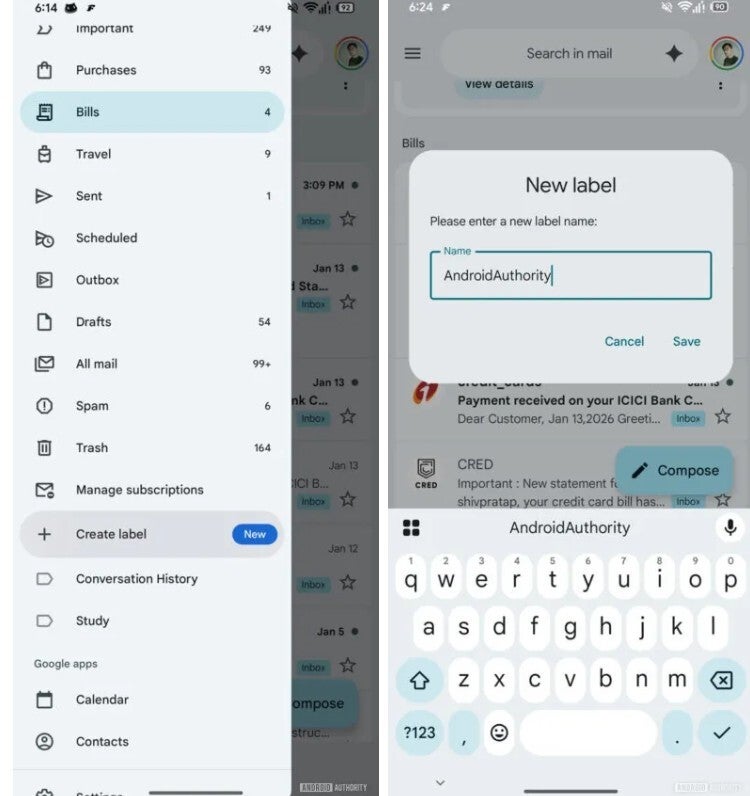
Creating a custom label on the Gmail for Android app. | Image credit-Android Authority
To edit or delete a custom label on Gmail for Android, you’ll tap the hamburger menu again, press Settings > Inbox > Manage labels. Follow these directions and you’ll be able to rename a custom label. On iOS you can go to Settings > Inbox customizations > Labels. Select the label you want to edit and tap on the arrow at the end of the listing. To change the spelling, under the section that starts with Name, to the right of the label name you want to change is a small arrow. Tap it and there will be a bar at the top that you can use to type the edited label name in. When you’re done, press the blue “done” box at the bottom right of the screen.
Only you can access your custom Labels
On the other hand, to delete a custom label, go to Settings > Inbox customizations > Labels. Select the label you want to edit and tap on the arrow at the end of the listing. On the next page will be, in red, the words “Delete” followed by the custom label you want to remove, Tap on it to see another prompt that will allow you to confirm the deletion.
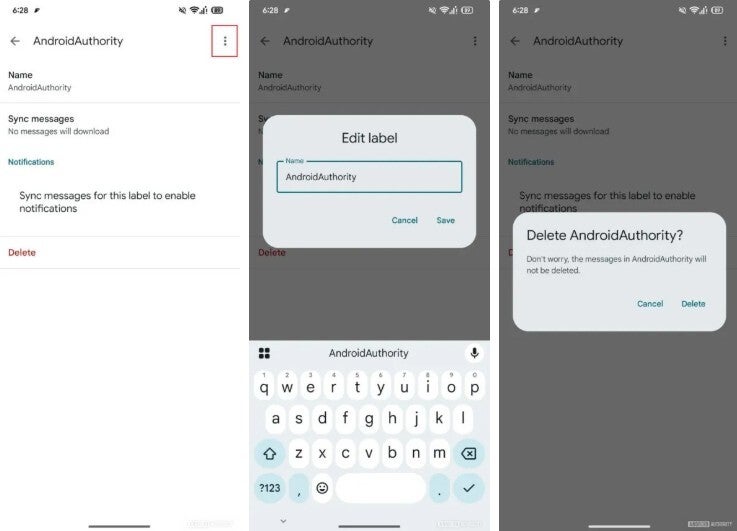
Deleting a custom label on the Gmail for Android app. | Image credit-Android Authority
The difference between folders and labels
Before you get terribly excited about this new feature, there is a possibility that Google could decide not to add this feature to the Gmail for Android app. Even if that is the case, the custom labels will certainly remain available for iPhone and iPad users along with those who create custom labels on the desktop version of Gmail.
link